
Accepting Items
Introduction
On June 8th, Year 9 (aka 2007) Neopets made it so that you must accept any items sent to you by other users. While this makes it easier to rid yourself of unwanted dung, if you don't know how it works you could be out a good many items.
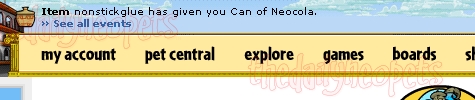
How does it work?
First things first. Click the Item icon. It's been around forever, but now, rather than taking you to your inventory where you can simply view the items that were sent to you, it takes you to your Item Event Log.
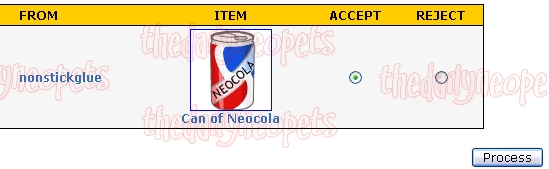
Now that you're at the Event Log you can choose to accept or reject the item by clicking the button under the one of your choice and pressing Proceed. I'm accepting this item, so I choose the Accept button.

After you hit Proceed the screen will refresh you'll see the message above (unless of course there are more items there), and the items you accepted will be in your inventory while the ones you rejected will get sent back to the sender with a neomail from TNT saying that it was rejected.
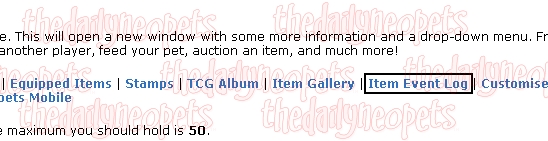
Oops, did you clear the icon but not accept/reject by accident? No problem, just click on "Item Event Log" in the Jump To links list and you'll be taken to the right screen. Remember, if you don't accept or reject an item after 48 hours, it will be sent back to the sender automatically.
Conclusion
As you can see, accepting an item is trivial. However, if you are frequently chatting on the Neoboard, you might notice that the other users tend to test out if you are a beggar. For instance, you could be sent that expensive Halloween Paint Brush you have always dreamed of... And if you were to accept it, other users might call you a beggar for accepting it. Name calling and harassment are unacceptable behaviors on the Neoboards, which means that you should report the users who are labeling you as a beggar if you get into that kind of sticky situation. To be on the safe side, reject items that come from people you don't know or have just met. Also, remember that you cannot receive any payment in items or Neopoints for offering a service such as a doing a graphic or coding a petpage. To avoid getting in trouble with the Neopets Team, turn down any item that comes from users that you have helped.
Alerts
 The Snowager
Next sleep in 6h, 23m, 7s.
 Next Possible Wake
Apr 19: 1 AM/PM NST
Apr 20: 6 AM/PM NST
Apr 21: 11 AM/PM NST
Apr 22: 4 AM/PM NST
 Obelisk War: Truce
Next cycle: 6d, 8h, 23m