

Finding Item IDs
What is an item ID?
Well, since there are over 35000 items currently on Neopets, TNT needs a way to keep track of them, and keep them in order. The way they do this is by using item IDs. Item IDs start at number 1 (the first item released on Neopets) and continue using every consecutive number. There are many ways to find an item ID and they will all be explained below.
How to find an item's ID...
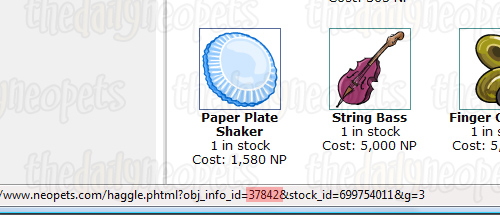
In a Neopets Shop, just hover your mouse over the item and look for obj_info_id= # the bar at the bottom of your window. After the "#" character is where the item's ID will be.
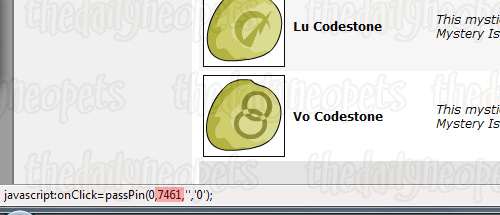
In your Safety Deposit Box, hover your mouse over the Rm One Link and look at the bar in the bottom of your window, the item's ID is the second number in the brackets (highlighted in the screenie).
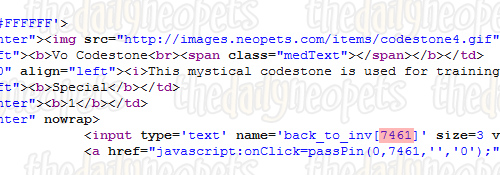
Or, you can view the source on your Safety Deposit Box page and search until you find your item's name, then look below it and find the words back_to_inv[#]. The text after the "#" is your item's ID number. The line is highlighted in the image below.
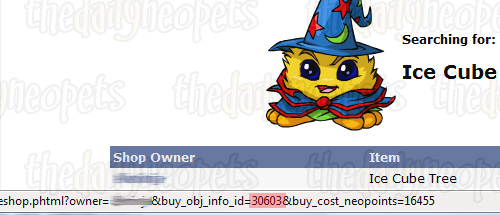
In a user's shop, just hover your mouse over the item that you want and look at the bar at the bottom of your window and find &buy_obj_info_id= #. The "#" character is where the item's ID will be. This is probably the simplest way to find an item's ID number.

To find an item's ID number in your Gallery, first go to the
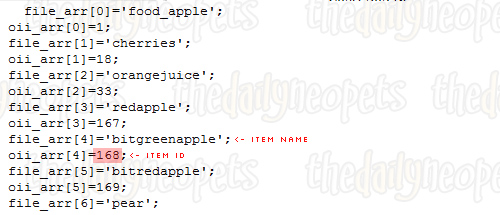
Quick Remove  page and view the source. Then scroll down a bit until you find a part that looks like
the image above. Then find your item's name and look at the line below it to see
the item's ID number - highlighted in the screenie.
page and view the source. Then scroll down a bit until you find a part that looks like
the image above. Then find your item's name and look at the line below it to see
the item's ID number - highlighted in the screenie.
Using the Shop Wizard, search for the item whose ID you are looking for, using "identical to my phrase". Then hover your mouse over the username of a person who is selling the item and look at the bar at the bottom of your window for &buy_obj_info_id= #. The item's ID number will be where the "#" character is. This is another fairly easy way to get an item's ID number.
On your Shop Stock page, view the source. Find the name of you item and scroll right until you get to the end of the line. There you should see a part that says name=back_to_inv[#]>. The "#" character is where your item's ID number will be.

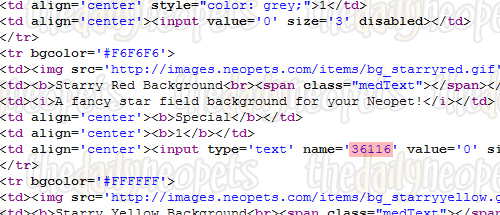
In your Closet view the source and then find the name of the item you're looking for. The item ID is just down from where you see the name, in the line where it says: type='text' name='#'. Again, the item ID will be where the "#" character is, as below.
Note: Paint brush wearables do not have item IDs so you won't be able to find any for those!
Well that's all there is to know about finding item IDs, so now that you know, why not go item ID finding crazy and annoy people with your all knowing mind ;)
Alerts

 The Snowager
Next sleep in 4h, 12m, 38s.
 Next Possible Wake
Oct 20: 6 AM/PM NST
Oct 21: 11 AM/PM NST
Oct 22: 4 AM/PM NST
Oct 23: 9 AM/PM NST
 Obelisk War: Join Faction
Next cycle: 2d, 22h, 12m
Neopia Today


The Runway Contest

Recently At Forums
- Tuesday, October 20
- Festival of Fears: Kanriks Chronicles
- Monday, October 19
- Sunday, October 18
- Saturday, October 17