

Healing the Vaeolus
| Navigation | ||||
|---|---|---|---|---|
|
1. Beginning 2. Observatory 3. Sleeper 4. Dreamer 5. First to Rise 6. Farmer |
7. Dancer 8. Wave 9. Gladiator 10. Collector 11. Thief |
12. Gatherer 13. Protector 14. Hunter 15. Conclusion 16. Prizes |
Constellation Finder Healing the Vaeolus Water Plant Guide Gears Guide Spellbook Finder |
|

Healing the Vaeolus
Healing the Vaeolus is probably the trickiest step of the Altador Plot. Almost everybody experiences some trouble when the time comes to cure the little Petpet.
Before starting on this part, make sure to cut out all distractions. It is a good idea to close your instant messenger windows, for example. Also, make sure you have completed all the previous plot steps. Obviously you'll need to have found the Vaeolus and have the medicine, the blueberry pie and the bandages in your possession. They won't appear as items in your inventory, but we explain how to get them here.
Now that you are ready, head to the Lenny Archivist's room and click on the petpet. Depending on what it looks like, you will have to perform different actions. Here is a summary of all the possible statuses of the Vaeolus and the actions that you have to take for each status.
| Status | Action to do |
|---|---|
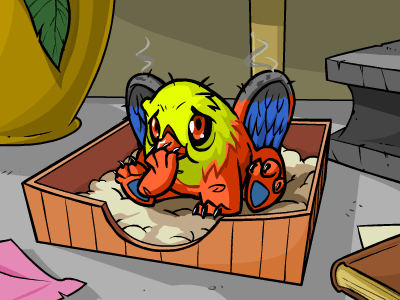 |
Give Medicine |
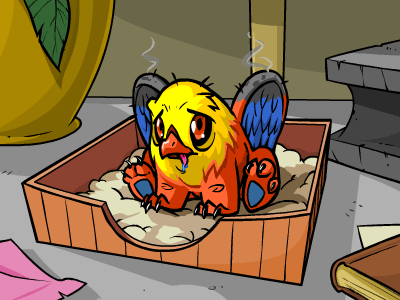 |
Feed |
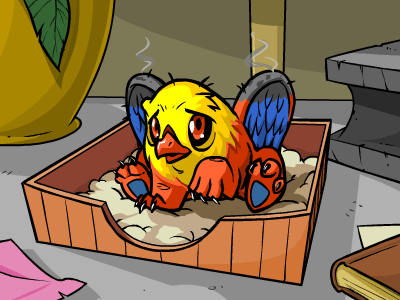 |
Bandage |
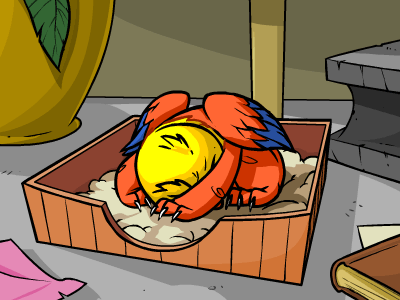 |
Wait |
Now, each time you check on the petpet you will have to perform the respective action. Make sure you perform the correct action within a few seconds of checking on the petpet. Once you've performed an action, wait until the next minute before checking on the petpet and performing the correct action again. Remember, the time between actions doesn't matter - what matters is that there is one action performed per minute. Always keep an eye on the clock in the top right corner of the Neopets menu.

Look over here! I'm pretty useful!
Here is an example of the process:
- 8:26:00 am NST: Load the page (Do not check on the Petpet)
- 8:26:03 am NST: Give Medicine
- 8:27:00 am NST: Check on the Petpet
- 8:27:02 am NST: Bandage
- 8:28:00 am NST: Check on the Petpet
- 8:28:02 am NST: Wait
- 8:29:00 am NST: Check on the Petpet
- 8:29:04 am NST: Bandage
- And so on...
Also, it's very useful to keep track of what you're doing (use Notepad or a piece of paper). Just record what you did and what the time was when you did it. That way, not only will you know how many actions you have done so far, but you'll be able to state exactly what you did if you ever need to get help on our forums.
The Skeith should appear when you check on the Vaeolus after your tenth action. If this doesn't happen, then you most likely made a mistake somewhere - this happens to everybody and it shouldn't be too much of a problem. Just go back to the Archivist's room to reset the step, then try again.
Still having trouble? Clear your browser's cache and take a break! The Petpet won't win over you. All it takes is patience and good timing! Good luck!
Alerts
 The Snowager
Next sleep in 6h, 40m, 59s.
 Next Possible Wake
Oct 19: 1 AM/PM NST
Oct 20: 6 AM/PM NST
Oct 21: 11 AM/PM NST
Oct 22: 4 AM/PM NST
 Obelisk War: Truce
Next cycle: 1d, 0h, 40m
Neopia Today


The Runway Contest

Recently At Forums
- Festival of Fears: Kanriks Chronicles
- Monday, October 19
- Sunday, October 18
- Saturday, October 17
- Happy Jetsam Day!